
Top > How to watch TV
How to watch TV
Available on Netflix
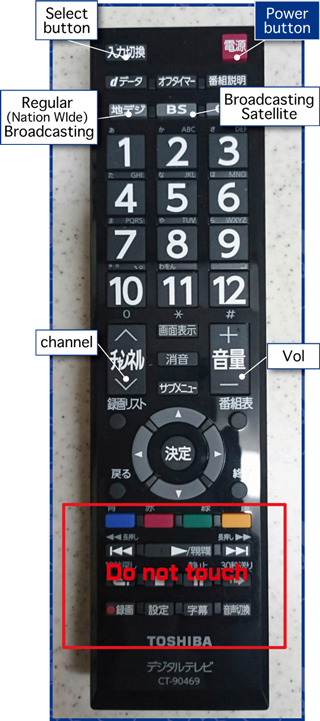
- 1Turn on TV
- 2Please press "select button" and choose TV mode.
- 3If you want to watch "regular broadcasting" , press "regular broadcasting" button.
If you want to watch "broadcasting satellite, BS", press "broadcasting satellite" button. - 4To select channel, press "channel" button or number from 1~12.
- 5You can control volume from "Vol" button.
- Caution
- If you cannot turn TV on from the remote controller, please press a power button on the left side of TV monitor.
Channel
[1ch]NHK / [4ch]MBS Mainichi Broadcasting / [5ch]KBS KYOTO / [6ch]ABC Television / [8ch]Kansai Television / [10ch]Yomiuri Television / [12ch]NHK E Television